

Makerspace Tech Supports Small Group Collaborative Math Learning
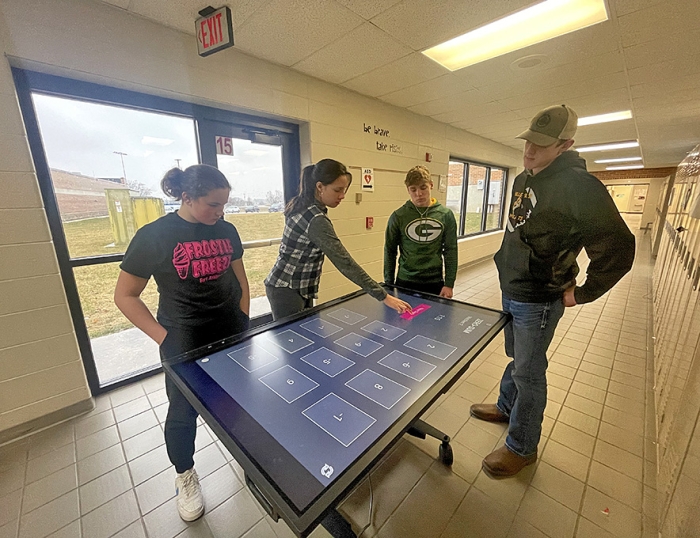
From left: MS Math Students working with Clevertouch Interactive Display, Story Fossum, Alanna McRoy, Jesse Luchsinger and Ethan Butts. Photo courtesy of Marie Perry
School libraries offer more than just books these days – through makerspaces, students can access many additional non-print resources to help them learn and grow. The purpose of makerspaces in libraries is to provide extended learning opportunities that students may not be able to access at home or that can further enrich curriculum in the classroom. Some school and public libraries have set-up their makerspaces to include things like 3-D printers, sewing machines, Lego kits, knitting machines, green screen kits for stop-motion video production, and recording studio equipment, just to name a few! School library makerspaces are building blocks for STEAM programs and prepare students for similar resources offered at the university-level such as UW-Madison (https://making.engr.wisc.edu/).
One recent acquisition to the Belleville Middle and High Schools’ library is a Clevertouch Interactive Display that can be set-up in a desktop position for collaborative learning opportunities. Students can work together using its touch screen features, teaching apps, and with “Infinity Whiteboarding”, the device offers numeracy tools and handwriting-to-text recognition (including the ability to insert things like images) that can then be shared to student devices for extended learning.
Starting on January 17, the middle school math team, made up of Erin Treder, Cathalee Koeninger, and Melissa Whitmore, along with Administrator Kyle Loshaw, decided to switch things up for the second semester. Instead of pulling students out for small group instruction that only benefitted about 15 students every 8-9 weeks, the team re-grouped after looking at the math data and decided to use math class time differently to benefit more middle school students.
“Twice a week, the team does small group math stations - once for seventh grade math and once for pre-algebra. The team takes the data from assessments and daily work and creates 3-4 small groups for the class period. The small groups focus on skills that need more attention like working with fractions, decimals, reading word problems, solving equations, and integers. Then on the day of stations, students rotate through the groups, focusing on the skills that were identified as needing more attention for additional practice or re-teaching to help students be successful in class. Small group activities have a mix of independent work time, direct instruction, and collaborative working time,” explains Melissa Whitmore.
Students involved in this collaborative work were excited to learn in new ways. As a whole, Mrs. Treder’s students noted that the math stations allowed them visual learning opportunities, peer support from group members, brain breaks, a better chance for their teacher to get around and see them working through problems, and overall was quite engaging.
As part of this station work, students had the opportunity to make use of the new makerspace Clevertouch Interactive Display as they worked together to solve problems related to integers.
Whitmore notes, “One of the skills that needed the most review this year in 8th grade was working with integers. The station focused on being able to use integers to make a sum of zero using three numbers. The students had two minutes, working as a team, to make as many matches as they could, using the Zero-Sum game on Geogebra. As they would make a match, new numbers would appear. The more familiar students became with the layout of the game, the more they worked together to strategize on how to beat the top score. It allowed students to take on leadership roles in a different way than they do in a traditional classroom.”
Students involved in this collaborative work were excited to use this new technology provided by the library and felt that it offered a unique way to learn.
Ethan Butts said, “I like that you are able to solve the equation your own way.”
“I like that it allows us to work together and really focus on one skill at a time,” notes Story Fossum.
Taryn Petro summed up his experience using the Clevertouch Interactive Display by emphasizing, “It made it easier to do the problems.”
While the new Clevertouch Interactive Display was adapted to mathematical use most recently, the possibilities are endless for student collaborative use across the academic disciplines. What is great about a piece of technology like this is that it is both adaptive and exciting and engages students to learn in new ways. In this way, school library makerspaces opens up opportunities for educators to extend their classrooms and challenge students in new ways – something Belleville schools hope to keep doing to benefit the academic needs of all of their students!
